
Everything inside Libra Financial
The software comes with every plan, so there is nothing to buy or set up. What follows is the full list of what it does today. What it does not do yet is at the bottom, in plain words.
Your books
- Set up by your CPA
- Your chart of accounts, customers, vendors and opening balances are in place before you log in. Moving from QuickBooks is quick and easy, and it is our job. We do it for you, so you do not have to.
- Statement upload
- Upload a CSV or OFX file from your bank, and duplicates are caught if you upload the same month twice.
- Suggestions from your own history
- Each new transaction gets a suggested category based on how you categorized that payee before, with the reason shown.
- Rules
- When the description contains X, categorize as Y. You can see every rule and add your own.
- Transfers recorded once
- Move money between your own accounts and it shows as one transfer, not an expense and an income.
- Credit cards as their own accounts
- Each card is its own account with its own transactions, so card spending never gets lost in checking.
- Split a transaction
- One charge across two or more categories, to the cent, with tags on each part.
- Tags
- Tag by location, job, department or anything else you want to track, with no limit on how many kinds of tags you use. Your CPA can make a tag required on an account so nothing slips through untagged.
- Ask for a new category
- Need an account that is not in your chart? Ask for it and use it right away; your CPA approves it and the transactions move with it.
- Your fiscal year, your way
- Calendar year, your own 12 months, or 13 four-week periods.
Money in and out
- Customers and vendors
- Add a customer or vendor in seconds by picking a type (Consultant, Supply, Service) and a name; it lands in the books and your CPA checks the setup after.
- Total paid, with the detail behind it
- Each vendor shows what you paid them this year; click it and see the payments that make it up. Same for what each customer paid you.
- Sales orders, sales invoices and sales credit memos
- Send a sales order or invoice from the portal, turn a quote or an order into an invoice, or issue a credit. You decide who in your company may send them.
- Purchase invoices
- Enter the purchase invoices you owe with their due dates, see what is coming due, and mark each one paid when you pay it. Record a vendor's credit memo against one.
- Purchase orders
- Draft a purchase order, email it, and edit it until the goods arrive.
- Sales tax on invoices
- Tax areas and rates applied on the invoice.
- Who owes you, who you owe
- Aging for customers and vendors, by name and by how late, with a chart.
- 1099 totals report
- Your CPA runs a year-end report of what you paid each 1099 vendor, net of refunds, against the year's threshold.
Reports
- The statements
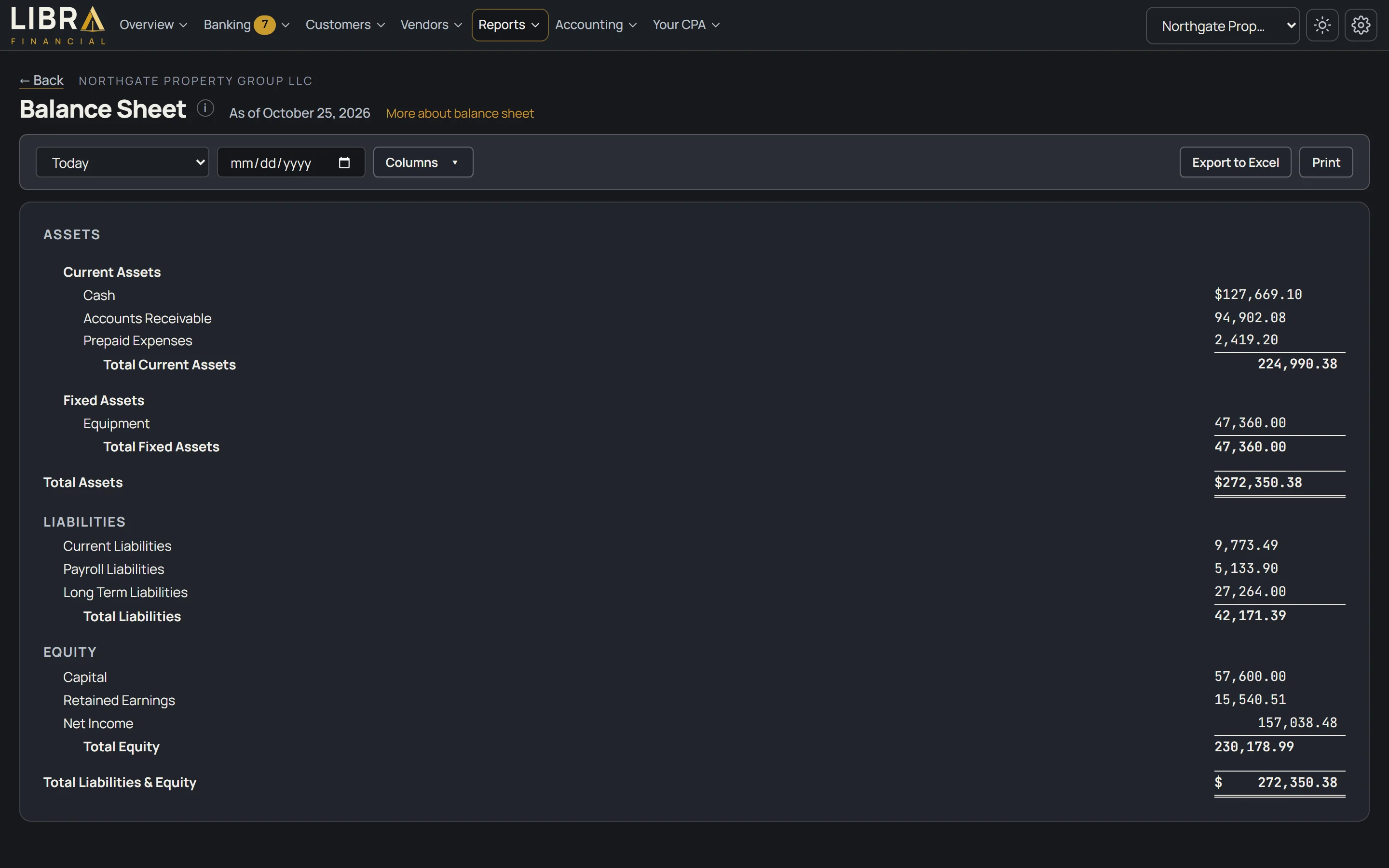
- Profit and loss, balance sheet, cash flow, trial balance, retained earnings, aging and the general ledger, by any date range.
- Classic layout, comparison columns
- This period against last period or last year, with the variance, laid out the way a CPA lays it out.
- Your own report layouts
- Build a report with the rows and columns you want and run it again next month. Included on every plan.
- Reports by tag
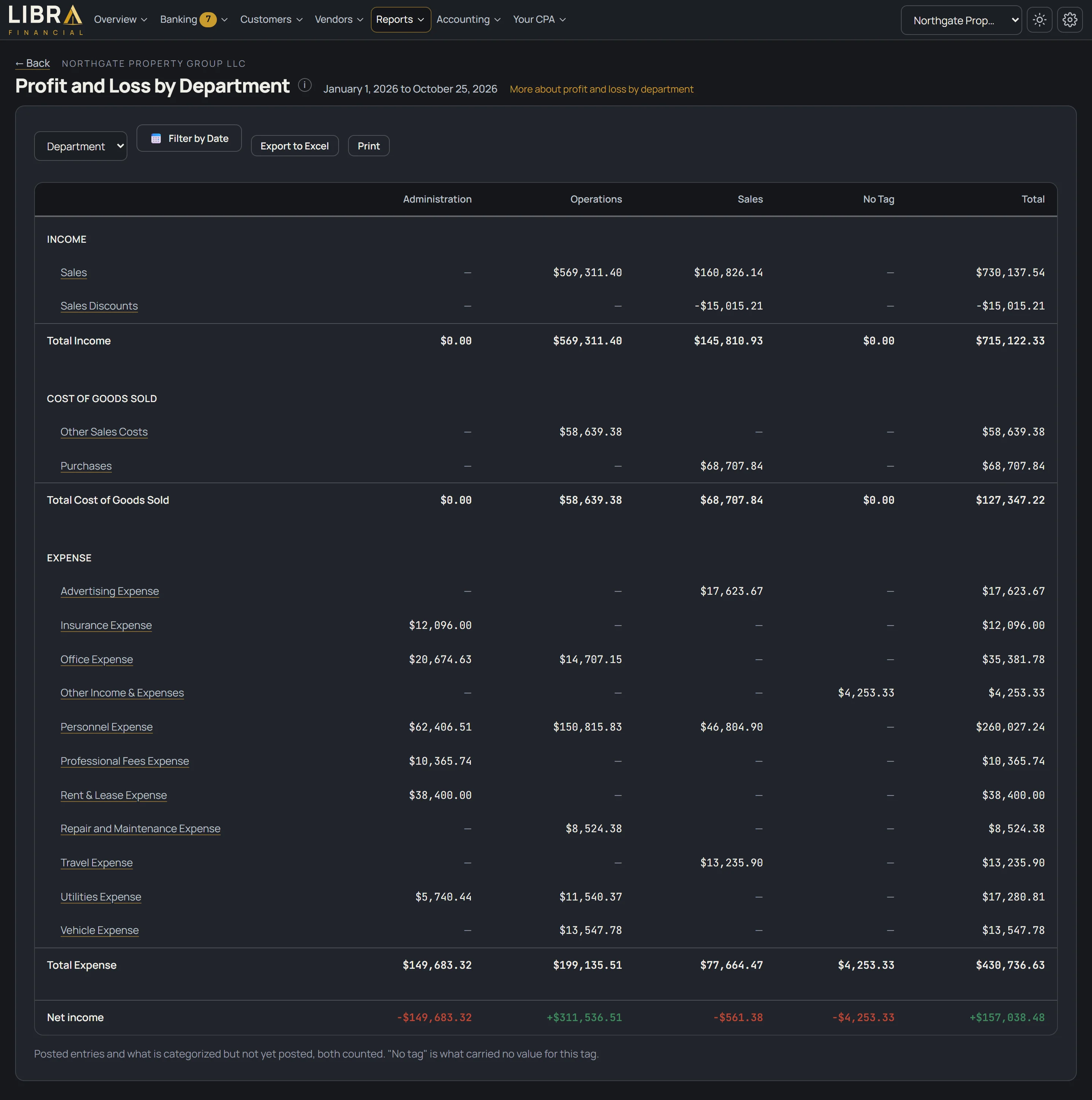
- A profit and loss column for each location, job or department.
- Charts
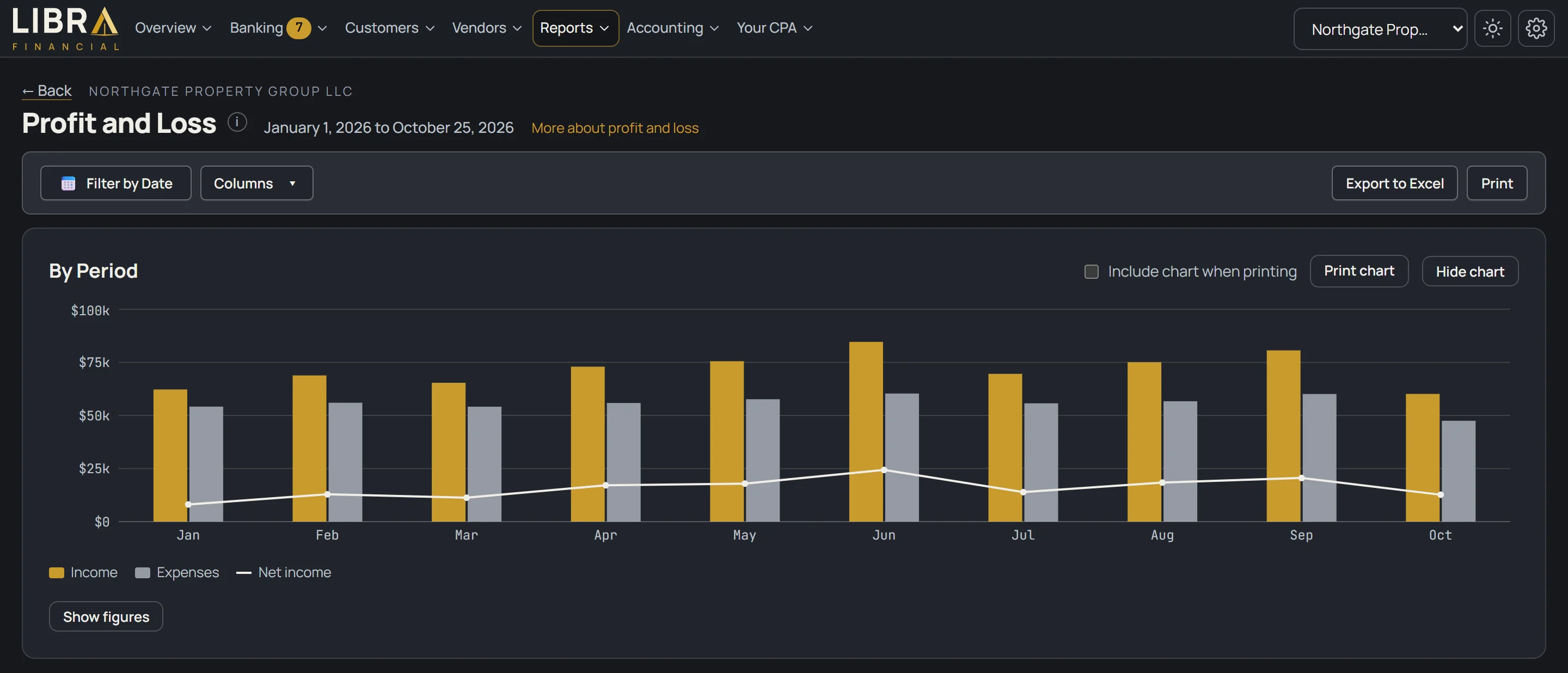
- Profit and loss by period, cash in and out, cash balance, expenses by category and aging, on your dashboard and above the profit and loss.
- Every number drills down
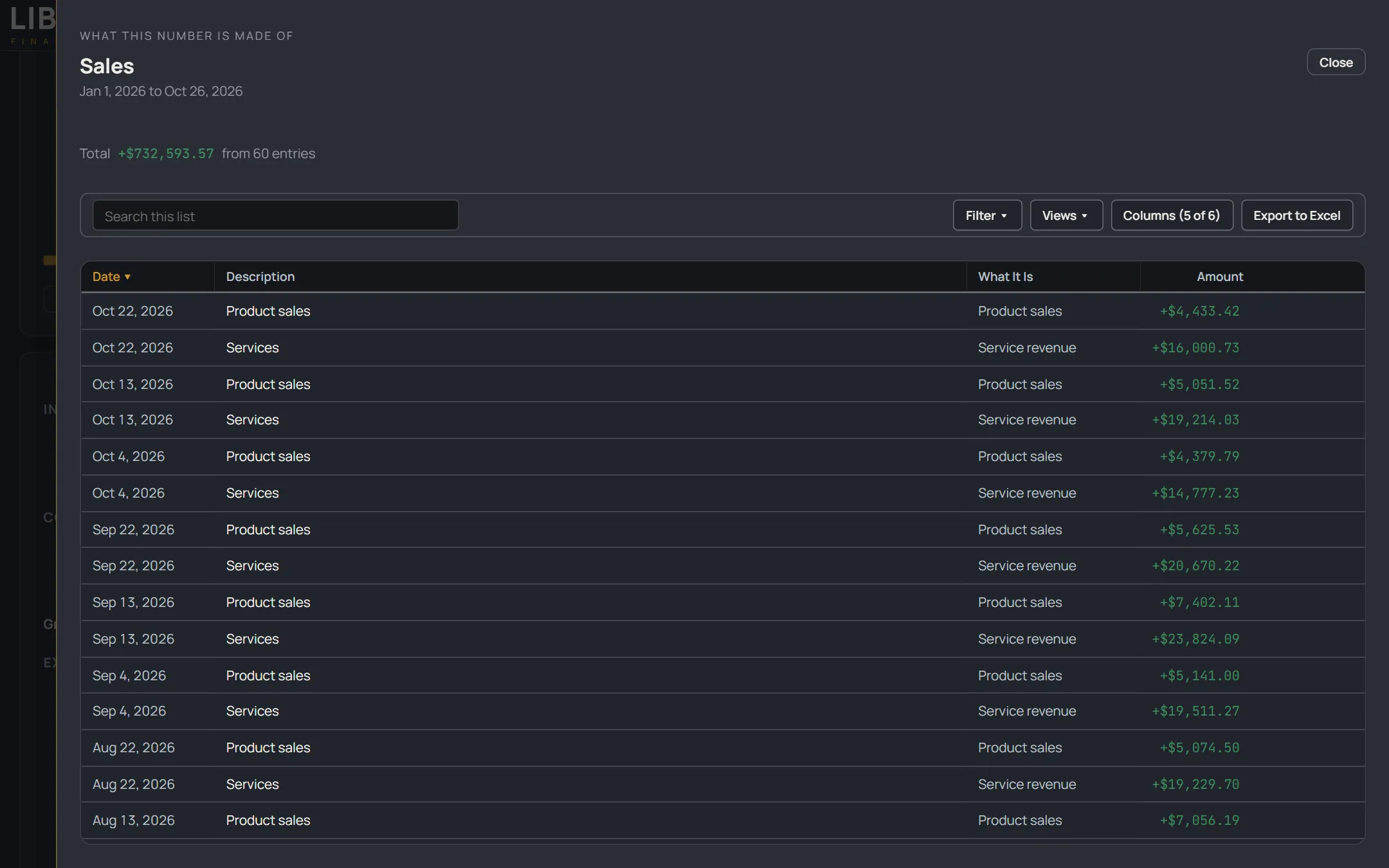
- Click any figure on any report, tile or list and see the entries behind it, with the same date range and filters, and export what you see.
- Excel export
- Every list and every report exports to Excel, laid out like a workbook, not a data dump.
- Print on your letterhead
- Statements print with your name, address and logo, with no firm name on them.
- Your dashboard, your layout
- Move and resize the tiles, add the ones you want, hide the ones you do not.

Working with your CPA
- Review before you send, review before it posts
- You see the totals and any held-back lines before you send; your CPA sees warnings (a missing tag, a closed period, a likely duplicate) before anything posts.
- Messages tied to the transaction
- Ask about a specific line and the answer stays with that line.
- Ask for a correction
- Flag a posted transaction as wrong, pick what it should be, and your CPA corrects it in the books, dated the day it happened.
- Change a tag yourself
- A tag on a posted transaction can be changed with no approval, because it moves no money.
- Request a transaction
- Paid for something with your own card or cash? Send the amount, date, what it was for and the receipt, and your CPA records it.
- Month-end tracker
- See where your CPA is in closing the month.
- Tax returns from the same books
- Business returns are prepared and filed by your CPA from the books we keep, so there is nothing to re-explain at tax time. Priced separately from the monthly plan.
- AI Ninja
- Ask a question about your own numbers ("what did I spend on fuel in March?") and get an answer from your books. It will not answer tax, legal or payroll questions; those go to your CPA.
- Activity log
- Who categorized, sent, split or posted each line, in plain words.
- A phone view
- Works in your phone's browser and installs from there, no app store: your numbers, your questions, receipts by camera, messages and reports.
Files and records
- Shared documents folder
- Drag and drop as many files as you want; what your CPA shares with you shows up in the same place.
- Receipts on transactions
- Attach a receipt to a line, or take the picture with your phone.
- Files on customers, vendors and purchase invoices
- W-9s, contracts and purchase invoices live with the record they belong to.
- Safe uploads
- Every file is checked before it is stored.
- Separate books per client
- Your books are kept separate from every other client's, and only the people you approve can see them.
More than one business
- Every entity under one login
- Each business is its own company with its own books, bank accounts, people and rules. You sign in once and switch between them in one click, with the same CPA on all of them. Each additional business is its own plan at 25% off that plan's price. Unlimited users per company, on every plan.
- All your companies on one screen
- Each company's figures side by side, and every figure opens that company's detail. The total row is a combined figure, not a consolidation.
- Consolidated statements
- One balance sheet and profit and loss for the whole group, with the money moving between your businesses taken out so nothing is counted twice. Your CPA sets up the consolidation once for your group and runs it at month end, so the figures are as of the last run. Click a figure to see the entries behind it. Ask us how it works for your businesses.
- Prepared for your own use
- Consolidated statements are prepared for your own use, with no assurance given, like every other statement in the portal.
What is not here yet
Coming, no date promised:
- Connecting your own bank. Today you upload your statements, or your CPA connects your bank and brings the activity in for you.
- Bank reconciliation. Today your CPA reconciles outside the portal; a reconcile screen is being built.
Not part of any plan today: payroll, inventory, multi-currency, paying your bills for you, taking card payments on your invoices, sales tax filing.
How Libra Financial compares
Compared on October 25, 2026, from each company's own pricing and features pages. Prices are US list prices after any introductory discount. We mark where the others win; we would rather you know before you sign up.
How to read it: Yes, No, Extra cost, or Coming (being built, no date). A letter points to a footnote.
| Feature | Libra Financial | QuickBooks Online | Xero | Wave | Patriot Accounting |
|---|---|---|---|---|---|
| What you get | |||||
| A CPA included in the monthly price | Yes a | Extra cost b | No | Extra cost c | Extra cost d |
| Books set up for you | Yes e | Extra cost b | No | Extra cost c | Extra cost d |
| Monthly price | $25 to $299, CPA included, same every month e | $38 / $85 / $140 / $340, software only f | $27 / $59 / $97, software only f | $0 / $19, software only | $20 / $30, software only |
| Bank rules that categorize repeat charges | Yes | Yes | Yes | Pro plan only ($19) | Not listed g |
| Profit and loss, balance sheet, cash flow, trial balance, aging | Yes, every plan, with your own report layouts | Yes h | Yes | Yes i | Yes i |
| Documents and receipts attached to transactions | Yes | Yes | Yes | Pro plan, or $8 a month on Starter | Premium plan only ($30) |
| Purchase invoices: enter, track, mark paid | Yes j | Yes k | Yes, 5 a month on Early | Yes, entered by hand | Yes |
| Invoices and quotes | Yes | Yes l | Yes, 20 a month on Early | Yes | Yes, quotes on Premium only |
| 1099 report | Yes, totals report run by your CPA m | Extra cost n | Yes | Extra cost o | Yes, e-file fee extra p |
| Ask your CPA to correct a posted transaction | Yes | No q | No q | No q | No q |
| Business tax return prepared by the same person who keeps your books | Yes, by your CPA, priced separately dd | Extra cost dd | No | Extra cost dd | No |
| Phone | Yes, in your browser r | Yes, paid plans | Yes | Yes | No app; mobile site |
| All your businesses under one login, one CPA | Yes s | Extra cost, one subscription per company t | Extra cost, one subscription per organization t | Yes, up to 15 businesses in one account t | Yes, one login; per-company billing not stated t |
| Consolidated statements across businesses | Yes, balance sheet and profit and loss for the group ee | Extra cost aa | No aa | No | No |
| Users included | Unlimited users, every plan | 1 on Simple Start, 3 on Essentials, 5 on Plus | No per-user fees | Not stated cc | Unlimited users cc |
| Where the others win today | |||||
| Bank feeds you connect yourself | Coming u | Yes | Yes | Pro plan only ($19) | Yes |
| Bank reconciliation | Coming v | Yes w | Yes x | Yes y | Yes |
| Payroll | No | Extra cost bb | Extra cost bb | Extra cost bb | Extra cost bb |
| Inventory | No | Yes, Plus plan and up ($140) | Extra cost, add-on on Growing and up | No | No |
Footnotes
- a On Self-Service ($25), your CPA sets up your books, posts your work and approves new accounts; there is no monthly review on that plan. Monthly review starts on Assisted ($49). On Full-Service ($199) and Plus ($299), your CPA does the books.
- b QuickBooks Live bookkeeping is sold separately; Intuit's pages showed no price on 10/25. Cleanup of existing books is a separate paid service, also unpriced on the page.
- c Wave's bookkeeping add-on: "starting at $199 a month" on its pricing page and "starting at $149 a month, billed annually" on its Advisors page, both read 10/25.
- d Patriot's bookkeeping service add-on starts at $100 a month (pricing page, 10/25).
- e Libra Financial: Self-Service $25, Assisted $49, Full-Service $199, Full-Service Plus $299 a month, the same every month. One-time setup and catch-up is $450 on Full-Service and Plus. Full-Service is for businesses with up to $15,000 in average monthly expenses.
- f QuickBooks: Simple Start $38, Essentials $85, Plus $140, Advanced $340 a month after a 3-month introductory discount; a free plan exists with limits. Xero: Early $27, Growing $59, Established $97 a month after the introductory period. Both read 10/25.
- g Patriot lists AI category suggestions on both tiers; we could not find bank rules on its pages on 10/25.
- h QuickBooks includes a profit and loss on every plan; receivables and payables reports start on Essentials ($85). Custom report layouts are on Advanced ($340) only.
- i Wave lists profit and loss, balance sheet and cash flow; Patriot lists profit and loss, balance sheet and general ledger. Neither names a trial balance or aging on its pages (10/25).
- j Libra Financial records a purchase invoice as paid from your bank account; it does not send the money. Nobody on this table pays your bills for you except QuickBooks and Xero, which offer bill pay.
- k QuickBooks includes bill management and ACH bill pay from Simple Start.
- l QuickBooks' free plan allows 2 invoices a month; paid plans are unlimited.
- m A year-end report of what you paid each 1099 vendor, run by your CPA. Libra Financial does not e-file 1099s.
- n QuickBooks tracks 1099 contractors on Plus and up; e-filing starts at $14.99 for three forms, or through Contractor Payments at $25 a month (10/25).
- o Wave files 1099-NEC forms only with a Wave Payroll subscription (support article, 10/25).
- p Patriot creates 1099s and a free contractor portal on both tiers; e-filing is $20 for 1 to 5 forms (Patriot help page, date not confirmed).
- q In the other products you, or a bookkeeper you hire, edit the entry yourself. None has a built-in way to flag a posted transaction to a CPA who then fixes it in the books.
- dd QuickBooks: tax preparation is sold separately as QuickBooks Live Tax, with no current price shown. Wave files through Block Advisors, priced separately. Xero and Patriot sell software only. Read via search on 10/25 (sources T1 and T2).
- r Libra Financial's phone view works in your phone's browser and installs from there. There is no app-store app and no push notifications.
- s Each business has its own books; the figures for all of them show on one screen and every figure opens that company's detail. The total row is combined, not consolidated. Each additional business is its own plan at 25% off that plan's price.
- t QuickBooks Online: each company needs its own paid subscription (Intuit help). Xero: one subscription per organization; its multi-organization discount is being phased out from October 1, 2026 and is not on the US pricing page. Wave: up to 15 business profiles in one account; whether each needs its own Pro plan is not stated. Patriot: one login and a company switcher across accounts; per-company billing not stated on its pages. Read 10/25.
- ee One balance sheet and profit and loss for all your businesses, with the money moving between them taken out. Your CPA sets up the consolidation once for your group and runs it at month end, so the figures are as of the last run. Prepared for your own use, with no assurance given.
- aa QuickBooks Online has no consolidation; Intuit sells it in Intuit Enterprise Suite, a separate product with no public price. Xero has no built-in consolidation (its product forum lists it as not planned); third-party apps fill it at extra cost. Wave and Patriot: none found. Read 10/25.
- cc Wave's pricing page lists "add users to your account" with roles but no count; Patriot's pricing page says unlimited users. Both read 10/25.
- u Today you upload your statements, or your CPA connects your bank and brings the activity in for you. A screen where you connect your own bank is being built.
- v Your CPA reconciles today outside the portal; a reconcile screen is being built.
- w QuickBooks' pricing page lists "reconcile your books" under Plus; Intuit's help pages describe reconciliation on every plan. Treat the plan as unconfirmed (10/25).
- x Xero includes reconciliation on every plan; the automatic version is $5 a month on Early and included from Growing.
- y Wave's reconciliation tool is on both plans; the automatic bank feed that makes it easy is Pro only (older Wave page, 10/25).
- bb Payroll add-on prices on 10/25: QuickBooks from $44 a month plus $6.50 per employee (introductory bundle); Xero through Gusto, $36 a month plus $6 per person; Wave $40 a month plus $6 per employee; Patriot from $17 a month plus $4 per worker.
Sources for every cell are kept with the site's code and re-read before each update to this table.
See it on your own books.
Tell us about your business and your CPA sets up your books. Or talk it through in 15 minutes.