I set it up.
Accounts, customers, vendors and opening balances, before you ever log in. You start with books that are right.

QuickBooks and Xero hand you an empty app. Libra Financial hands you books a CPA already set up, keeps every month, and stands behind when your bank asks. Books and tax returns from one CPA. One monthly price for the software and your books.
From $25 a month. A CPA does all of it from $199.
Full-Service is for businesses with up to $15,000 in average monthly expenses. One-time setup and catch-up is $450.
You do this. Then the next eight screens. Then every month after.
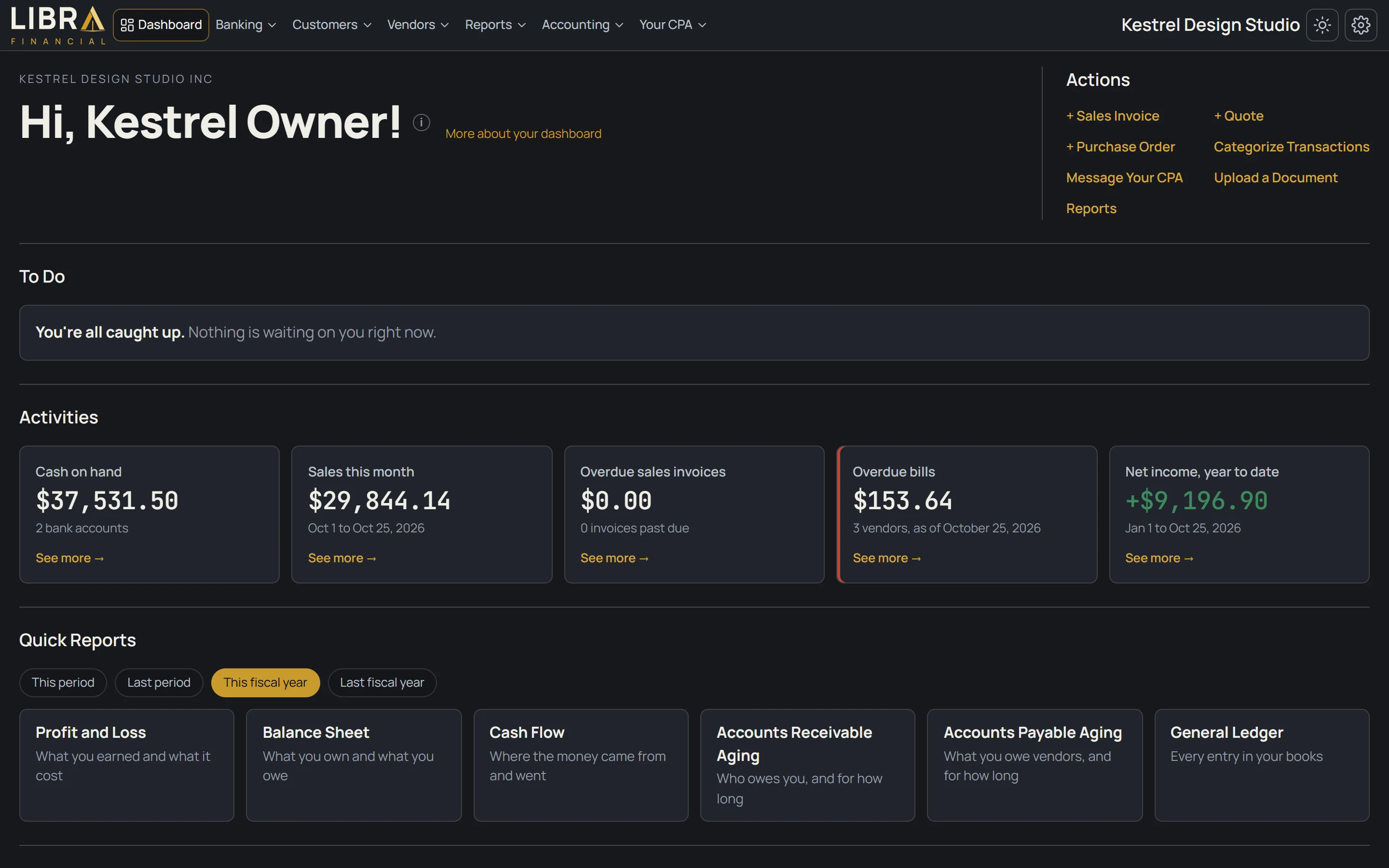
You buy the accounting software. The box says it's easy.
Nobody sets it up. The bank feed lands in the wrong accounts, every unfamiliar charge gets a new one, and the profit and loss stops making sense.
A year later, at tax time, someone charges you to untangle it.
Here, your CPA sets up your books before you log in, so there is nothing to untangle later.
Libra Financial is an online CPA service for small businesses: books set up and kept by a CPA, with the software included. It is based in Southfield, Michigan. The work is done by Dean Akeel, CPA (Michigan CPA license no. 1101042895, issued to Dean Abu-Akeel), who sets up each client's books and keeps them every month in Libra Financial's own software, which is included in every plan.
Plans are $25 a month (Self-Service: you do the bookkeeping, a CPA sets up and posts your books), $49 (Assisted: you categorize the routine lines, your CPA answers the rest and reviews the books every month), $199 (Full-Service: your CPA does the books, for businesses with up to $15,000 in average monthly expenses) and $299 (Full-Service Plus, for $15,000 to $50,000 a month). One-time setup and catch-up is $450 on the Full-Service plans. The price is the same every month.
Libra Financial works for owners of more than one business. Each business has its own books, bank accounts, people and rules; the owner signs in once, switches between them in one click, and sees every company's figures on one screen. Your CPA can also consolidate the businesses: one balance sheet and profit and loss for the whole group, with the money moving between the businesses taken out so nothing is counted twice. The CPA sets up the consolidation once for the group and runs it at month end, so the consolidated figures are as of the last run. Each additional business is its own plan at 25% off that plan's price.
To start, fill in the short form at https://libra-financial.com/get-started or book a 15-minute call with Dean. He replies within 24 to 48 hours. Questions go to support@libra-financial.com.
Accounts, customers, vendors and opening balances, before you ever log in. You start with books that are right.
Routine lines categorize themselves. I handle the rest, close the month, and you see only the few questions that need you, like what a check was for.
Profit and loss, balance sheet and cash flow, by any date range, on your letterhead, from books I keep every month. Print them the same day your lender asks. If the lender has questions about the numbers, I get on the call and walk them through the books.
Your business return is prepared and filed by your CPA from the books we keep, so there is nothing to re-explain at tax time. Priced separately from the monthly plan. Libra Financial's Michigan CPA firm license is in process.
Every plan includes the software and your CPA. The difference is who does the work.
Full-Service is for businesses with up to $15,000 in average monthly expenses. One-time setup and catch-up is $450.
See the planFull-Service is for businesses with up to $15,000 in average monthly expenses. One-time setup and catch-up is $450.
See the planFull-Service is for businesses with up to $15,000 in average monthly expenses. One-time setup and catch-up is $450. The $450 applies to Full-Service and Full-Service Plus.
See full pricingOne portal, every entity, and consolidated statements with the money between them removed.
Each business keeps its own books, bank accounts, people and rules. You sign in once, switch between them in one click, and the same CPA looks after all of them.
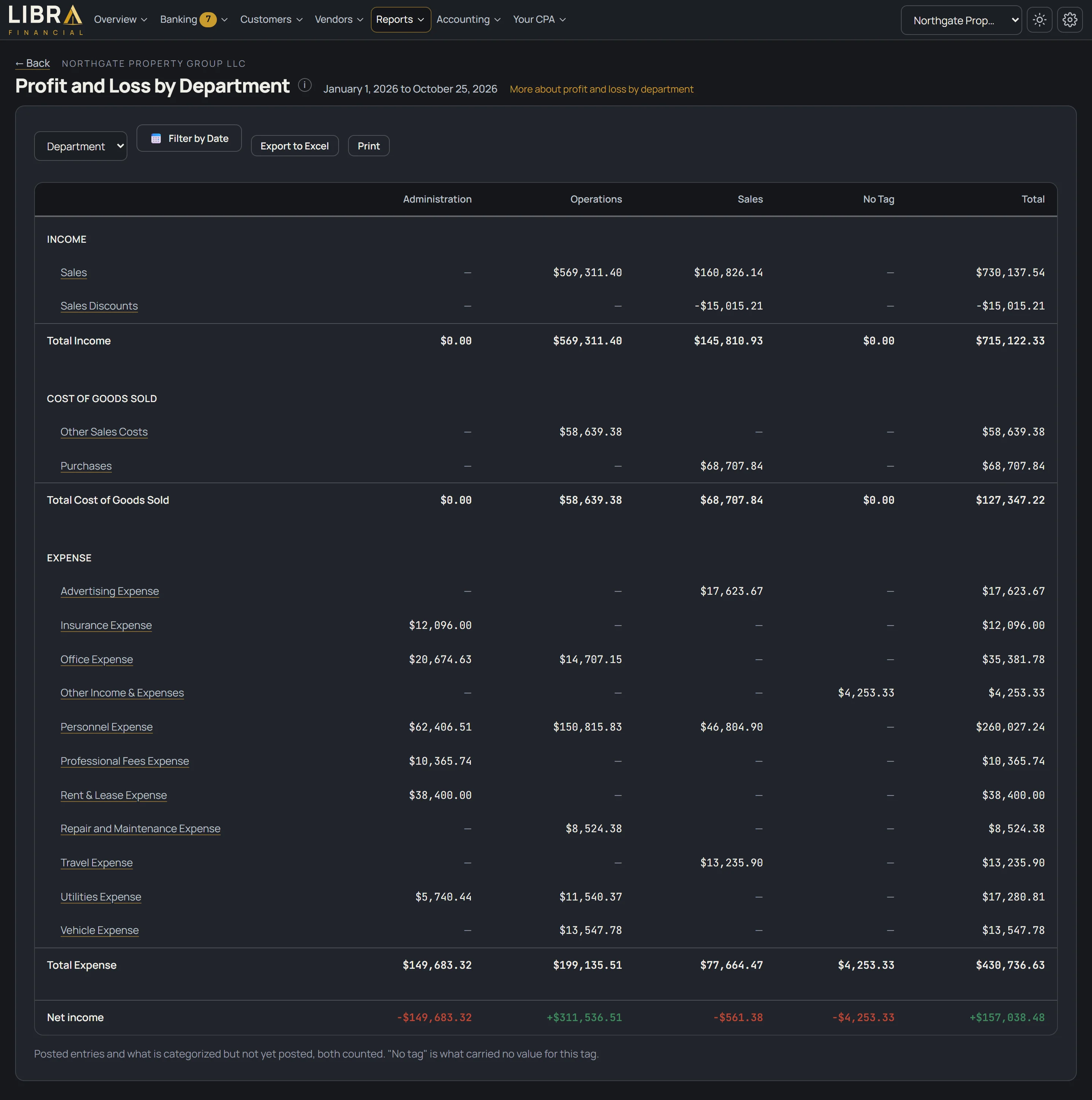
Each company's figures side by side, and every figure opens that company's detail. The total row is combined, not consolidated.
One balance sheet and profit and loss for the whole group. Money moving between your businesses is taken out, so nothing is counted twice, and you can click a figure to see the entries behind it.
Your CPA sets up the consolidation for your group of businesses once, then runs it at month end. The consolidated figures are as of that last run, and they are prepared for your own use, with no assurance given. Ask us how it works for your businesses.
Each additional business is its own plan at 25% off that plan's price. Unlimited users per company, on every plan.
A short form or a 15-minute call. We pick the right plan together.
Accounts, customers, vendors and opening balances, in place before you log in.
Bank rules and suggestions handle the routine lines. You see the few your CPA can't answer, like what a check was for.
Profit and loss, balance sheet and cash flow, live whenever you look.
Every screen is the real portal, running on a sample company.
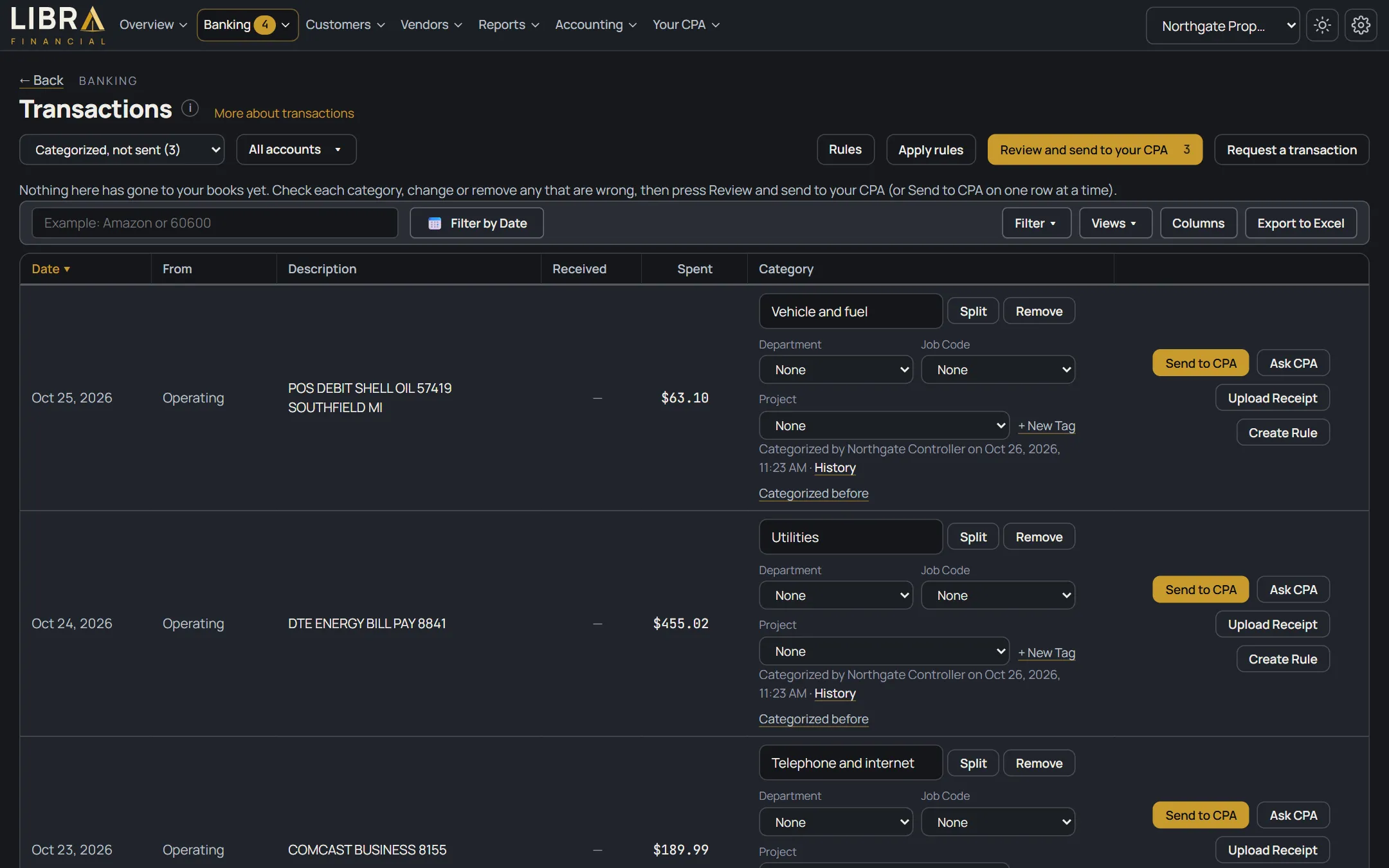
Libra suggests a category based on how you categorized before, and shows why. Accept it in one click, or pick another.
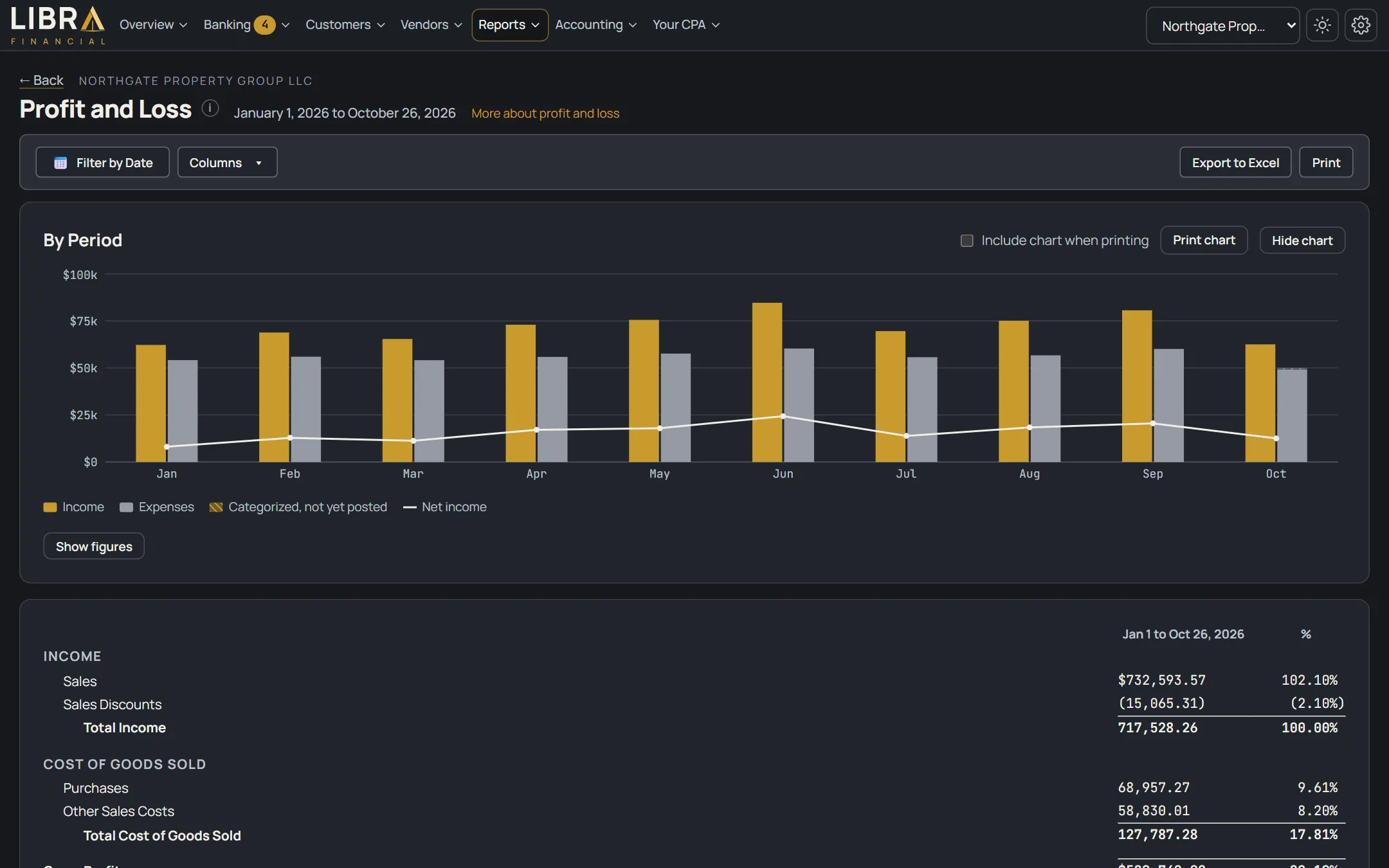
Profit and loss, balance sheet and cash flow in the classic layout. Change the dates, add last year next to this year, export to Excel.
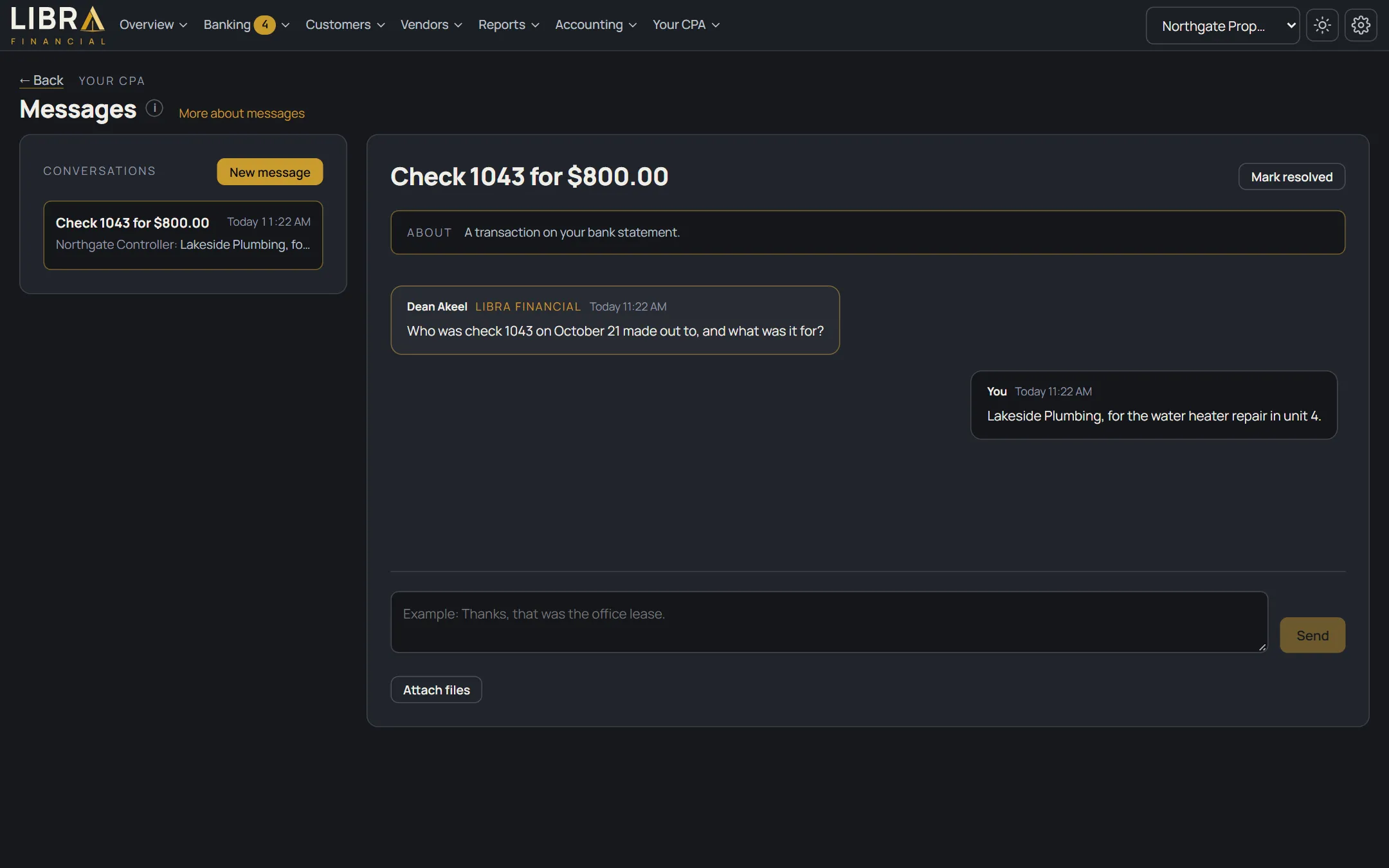
When your CPA needs something, you see it on your To Do list with the line attached. Reply in a sentence and it's done.
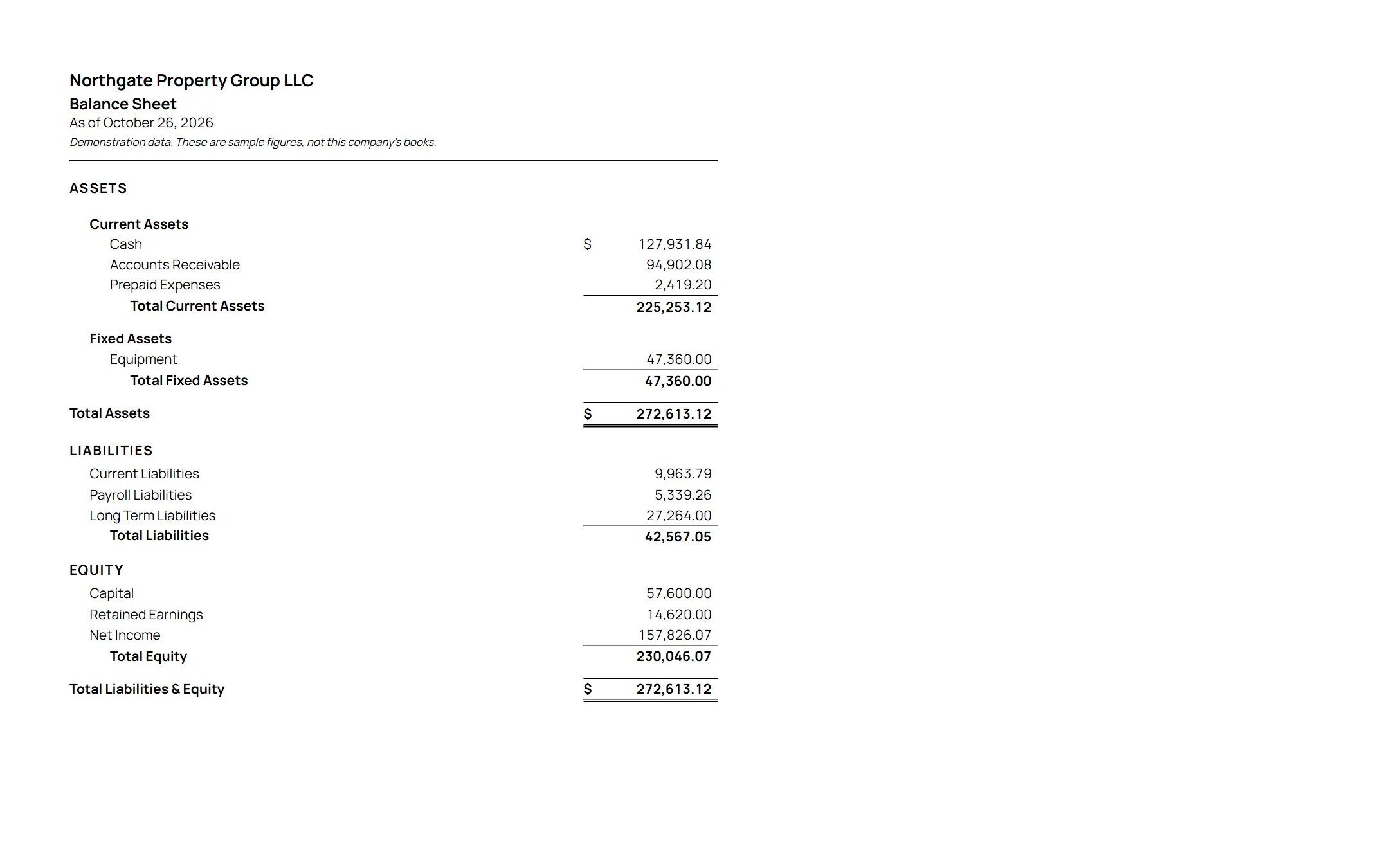
Profit and loss, balance sheet and cash flow, by any date range, on your letterhead, from books a CPA keeps every month. Print them the same day your lender asks. If the lender has questions about the numbers, your CPA gets on the call and walks them through the books.
Every chart and every report is live from your books. Pick any date range, put last year next to this year, and click any figure to see the transactions behind it.

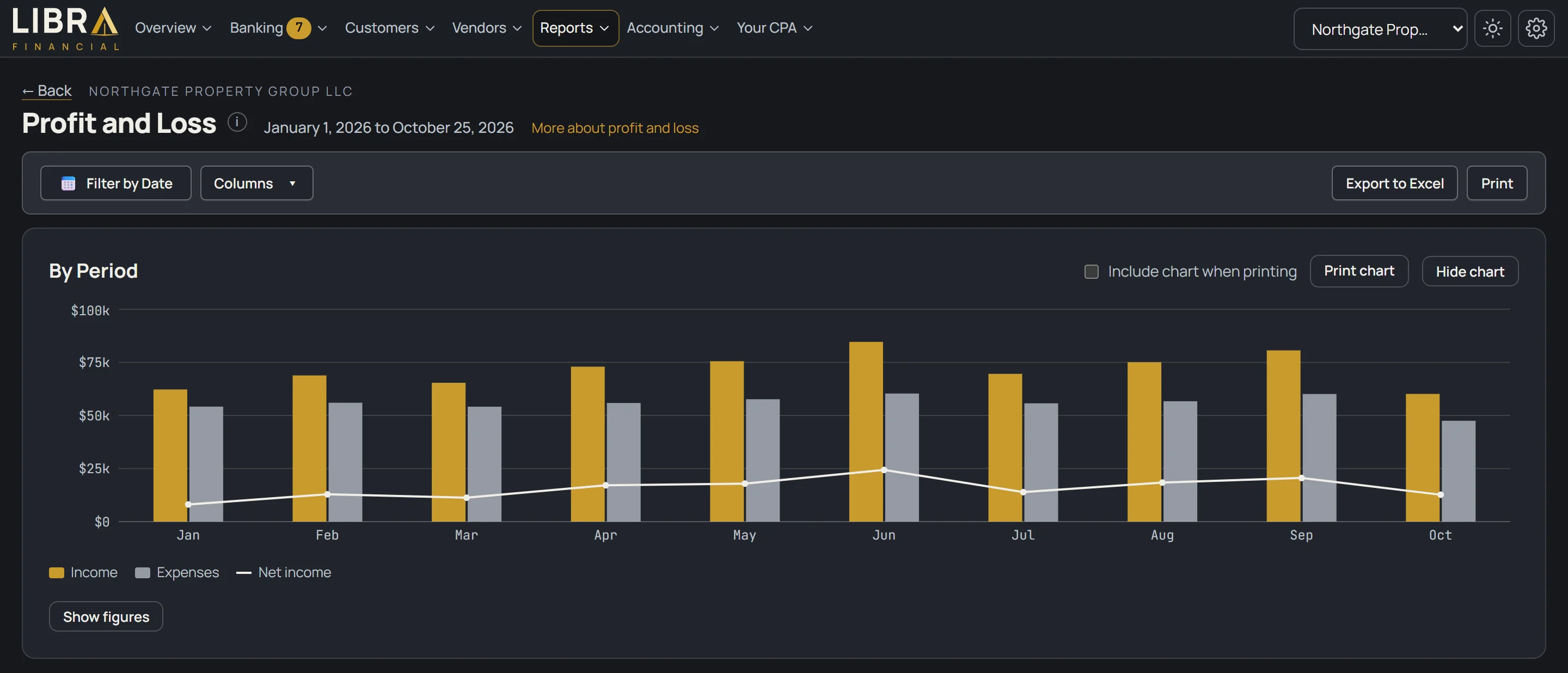
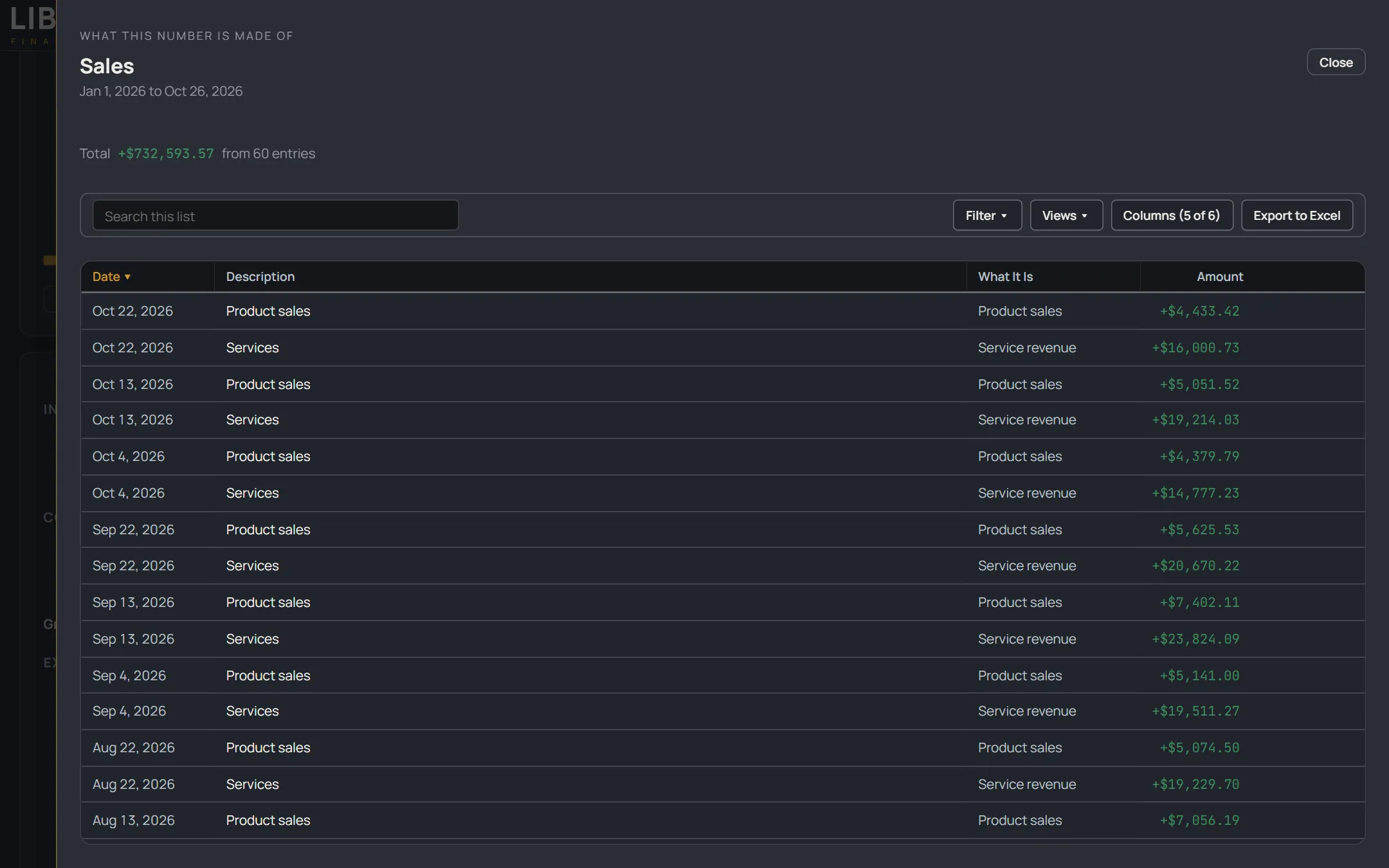
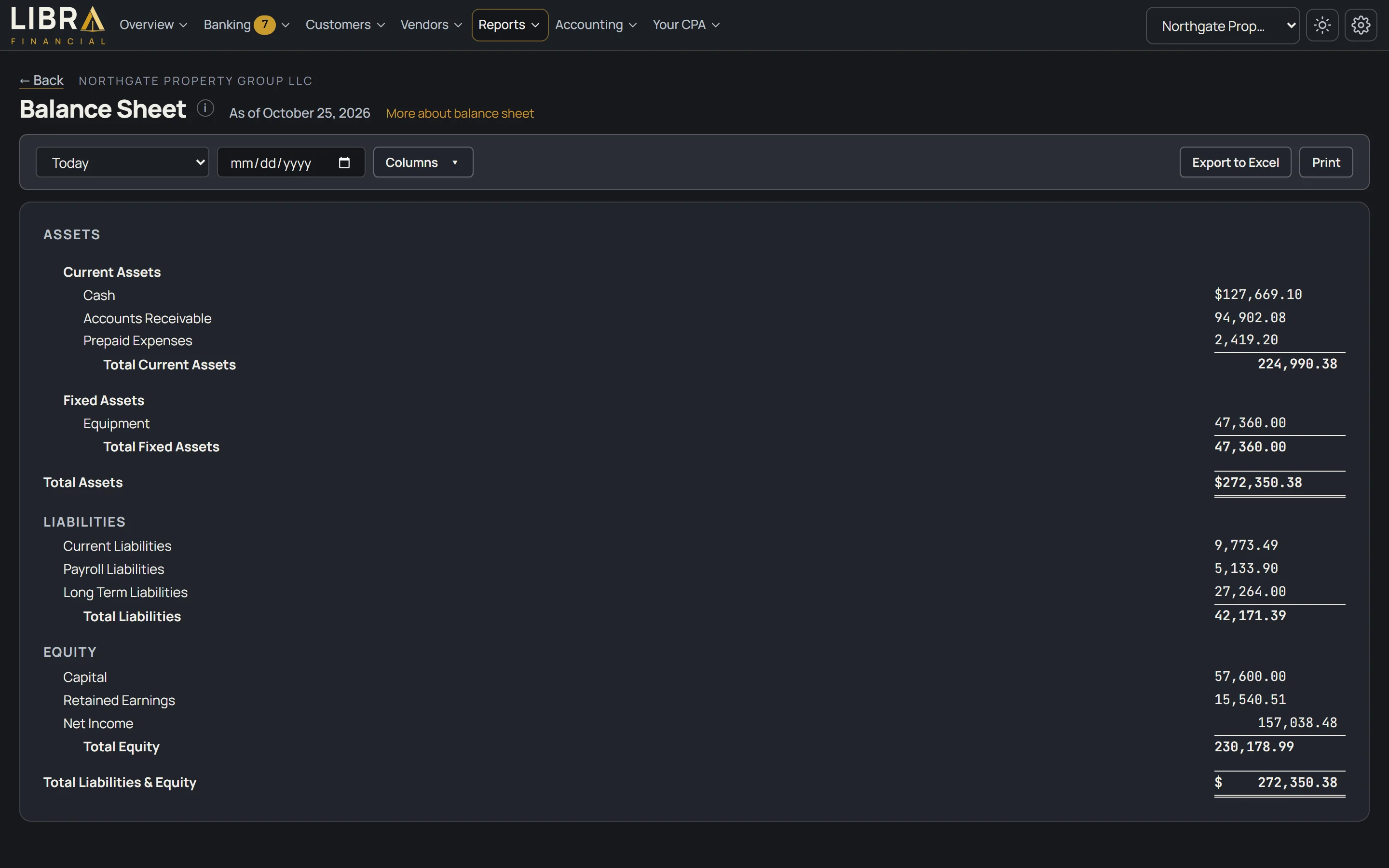
The software is included in every plan. Here is what is inside it.
Your CPA builds your chart of accounts, adds your customers and vendors and enters your opening balances, so you start on books that are already right.
Tell it once that "SHELL" is fuel, and every Shell charge after that categorizes itself; the rest get a suggestion based on how you categorized before.
Profit and loss, balance sheet, cash flow and trial balance, in a classic layout with comparison columns, printed on your letterhead or sent to Excel.
Click any figure on any report or tile and see the transactions behind it, then open any one of them.
Send quotes, sales orders and sales invoices to your customers, enter the purchase invoices you owe with their due dates, and mark them paid when you pay them.
Drag receipts, statements and contracts into a shared folder, attach a receipt to a transaction, or snap it with your phone.
Something posted to the wrong place? Flag it and your CPA corrects it in the books, dated the day it happened.
One login for every entity, every company's figures on one screen, and consolidated statements with the money between your businesses removed. The same CPA on all of them.
They sell software. If you want a person on your books, that's extra, or not offered at all.
| What | Libra Financial | QuickBooks Online | Xero |
|---|---|---|---|
| A CPA behind your books | In every plan | Sold separately | Not offered |
| Books set up for you | Yes | Do it yourself | Do it yourself |
| Who answers your questions | Your CPA | Support line | Support line |
| Price | Same every month | Promo for 3 months, then list price | Promo for 3 months, then list price |

I built Libra Financial because of how many times a client came to me to fix QuickBooks or another bookkeeping program. They bought it expecting it to work out of the box. Nobody set it up and nobody kept it up, and by the time it reached my desk it took hours, days, sometimes weeks to untangle, usually right before taxes.
The software was never the problem. Nobody was minding it. Every time, I wished the client had started with books a CPA set up on day one and kept right from there.
So that is what Libra Financial is. Not bookkeeping software you set up yourself, and not a bookkeeping service. It is an online CPA service.
I set up your books before you log in and I stay on them. I handle every client's books myself. You can see everything, any time.
I work from Southfield, Michigan. I'm one of five brothers, the third generation of CPAs in my family, and I played four years of Division 1 soccer at Oakland University. Questions? Email support@libra-financial.com or book a 15-minute call. I answer within 24 to 48 hours.
Yes. Dean Akeel, CPA, sets up and keeps every client's books himself, and he is who answers when you write in. Email support@libra-financial.com or book a 15-minute call; he replies within 24 to 48 hours. Assisted includes a 30-minute check-in call every quarter, and Full-Service a 30-minute call every month.
No. Your CPA sets up your books before you ever log in: accounts, customers, vendors and opening balances, with your bank activity brought in from the statements you send. You log in to books that are already right. There is nothing to install and no software to buy.
Four plans, one flat price a month, software and your CPA included. Self-Service is $25, Assisted is $49, Full-Service is $199 and Full-Service Plus is $299. Full-Service is for businesses with up to $15,000 in average monthly expenses; Plus covers $15,000 to $50,000. One-time setup and catch-up is $450 on the two Full-Service plans. Same price every month, not a 3-month promo. Unlimited users per company. Each additional business is its own plan at 25% off that plan's price.
Yes. Each of your businesses has its own books, bank accounts, people and rules, and you reach them all with one login and switch between them in one click. The same CPA looks after every one, and you can see all your companies' figures on one screen. Each additional business is its own plan at 25% off that plan's price. Unlimited users per company, on every plan.
Yes. Your CPA can consolidate your businesses into one balance sheet and profit and loss for the group, with the money moving between your businesses taken out so nothing is counted twice. Your CPA sets up the consolidation once for your group and runs it at month end, so the consolidated figures are as of the last run. You open them in the portal like any other report and click a figure to see the entries behind it. They are prepared for your own use, with no assurance given. Ask us how it works for your businesses.
No. The software is included in every plan. Once your books are set up here, you can cancel the old subscription. There's nothing else to buy.
Yes. Moving from QuickBooks is quick and easy, and it is our job. We do it for you, so you do not have to.
We don't repair the old file. Your CPA sets up your books here, right, and keeps them from there, so nothing wrong from the old file gets carried over by mistake. On Full-Service and Full-Service Plus, setup and catch-up is $450 and covers up to 3 months behind. More than that, we quote the catch-up by the month before we start.
[needs Dean: what we bring over from the old file: opening balances only, or full history]
Yes. When your lender asks for a year-to-date profit and loss and balance sheet, print them the same day, on your letterhead, from books a CPA keeps every month. If the lender has questions about the numbers, your CPA gets on the call and walks them through the books. Whether a lender accepts the statements is the lender's call, and we don't prepare loan applications.
Yes. Business returns are prepared and filed by your CPA from the books we keep, so there is nothing to re-explain at tax time. Priced separately from the monthly plan.
On Full-Service, answer the few questions only you can answer, like what a check was for, and read your reports. On Assisted, you categorize the routine lines and your CPA handles the rest. On Self-Service, you upload your statements and categorize your transactions, and your CPA posts them. Routine charges categorize themselves once a bank rule is set.
Most businesses can log in within a few business days of getting us their statements. Books that are behind take longer, and we tell you how long before we start.
[needs Dean: the exact number of business days]
Your books are kept separate from every other client's, and only the people you approve can see them. Each person has their own login with a one-time code the first time they sign in from a new browser. Everything moves over an encrypted connection and is stored encrypted.
Yes, up or down. Self-Service and Assisted are month to month. Full-Service and Full-Service Plus have a 3-month minimum, because the first months include catch-up work.
[needs Dean: when a plan change takes effect, and confirm month to month]
Libra Financial is in Southfield, Michigan, and everything happens online: your books, your statements, your questions and the calls. There is nothing to come in for. The portal works in your browser and on your phone.
Tell us about your business. We'll reach out within 24 to 48 hours, pick a plan with you, and start setting up your books.